
 Solutions
 Cyber Security
 Cloud Security
 DevSecOps Automation
 Cyber Threat Intelligence
 AI & MLOps Integration
 Security Operations
 Incident Response & Forensics
 Services
 Cloud Architecture & Migration
 Zero Trust & IAM Solutions
 SOC-as-a-Service
 Threat Detection & Response
 DevOps Infrastructure Design
 Penetration Testing & Red Teaming
 AI-Driven Security Analytics
 Industries
 FinTech Cybersecurity
 Healthcare Cybersecurity
 E-Commerce Security
 Government & Defense Security
 Telecom & IoT Security
 Managed Security Services
 24×7 Managed SOC
 Managed SIEM & SOAR
 Endpoint Detection & Response
 Vulnerability Management
 Cloud & App Security Monitoring
 Compliance Management
 AI Security Lab
 AI-Driven Threat Defense
 Neural SOC Platform
 Predictive Attack Modeling
 Security Data Lake
 Research & AI Lab
 Threat Intelligence Reports
 AI Security Models
 Machine Learning for Cyber Defense
 Open-Source Tools
 Publications & Whitepapers
 AI Innovation Center
 AI Research & Development
 Generative Security Models
 Autonomous Threat Simulation
 LLM Security Framework
 Future Technology Roadmaps
 Global Threat Observatory
 Global Cyber Threat Map
 Real-Time Attack Feed
 Regional Threat Reports
 Zero-Day Tracker & Alerts
 AI Risk Index Dashboard
 Resources
 Technical Insights & Advisory
 Case Studies & Solution Workshops
 Security Guides & Readiness Resources
 Technical Workshops & Team Enablement
 Knowledge Base & Operational Documentation
Secure IoT Device Onboarding: Identity, Access and Lifecycle Operations
Connecting a device to an IoT platform is only the beginning of onboarding. A dependable design also establishes who owns the device, what it may access, how its credentials change and what happens when it loses connectivity or leaves service. Reviewing that lifecycle before a fleet grows can prevent difficult operational and security problems later.
AI-assisted technical guide · Updated 12 November 2026
This guide is for teams planning business sensors, gateways and connected-device services. The examples concern monitoring and data collection; they do not prescribe changes to safety-critical equipment or physical control systems.
Define the device lifecycle and ownership model
Start with the states a device can enter: prepared, enrolled, active, temporarily disconnected, suspended, transferred and retired. Identify who can approve each transition and which system records it. Distinguish the physical device, its platform identity, its credentials and the business asset it represents. These relationships can change independently.
For example, a monitoring gateway might be replaced while the site identifier remains the same. The replacement should receive its own device identity and approved permissions, while the retired gateway should no longer be trusted as the current installation. Retain enough history to explain the replacement without allowing both devices to act indefinitely under one shared credential.
Create an inventory with the device identifier, model, software version, owner, installation context and support status. Store credentials in the appropriate protected systems rather than directly in a general inventory spreadsheet. Record the operational contacts who can identify the device physically and investigate a lost connection or suspected compromise.
Choose provisioning around the actual operating environment
Document where initial enrollment happens, how the device establishes trust and how it receives its intended configuration. A factory-provisioned fleet, a technician-installed gateway and a customer-enrolled device have different constraints. Include the possibility of an interrupted enrollment, a repeated request and a device sent to the wrong location.
AWS IoT Core documents provisioning through device resources, certificates and policies, including automated approaches using provisioning templates. The provisioning method should fit the manufacturing or installation workflow and the team’s credential-handling capabilities. Review the current AWS IoT device provisioning documentation when designing an AWS-based deployment.
Separate enrollment authority from normal operating permissions. A device that has completed provisioning should not retain unnecessary powers to enroll other devices or claim arbitrary business identities. Define how a failed or abandoned enrollment is cleaned up, and test whether repeated attempts create duplicate inventory or platform records.
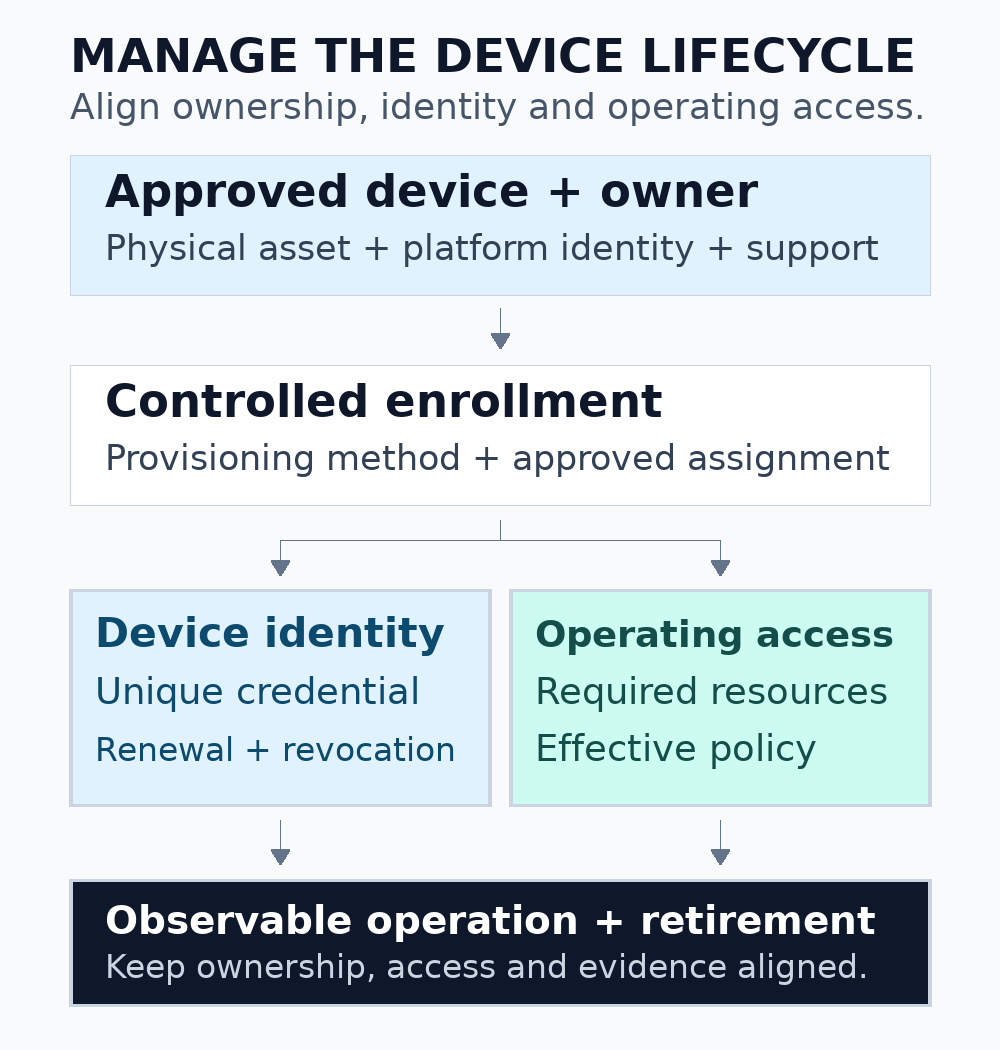
Figure 1. Model enrollment, operation and retirement as controlled transitions with evidence and an owner.
Give credentials a manageable lifecycle
Determine how a device proves its identity and where the associated secret material is protected. Review the capabilities of the hardware, operating system and platform together. Avoid assuming that every device can safely store the same type of credential or complete the same renewal workflow while unattended.
AWS recommends a unique X.509 certificate for each device or client to support fine-grained management, including revocation. Registration and certificate status are part of its authentication model. Review the AWS IoT X.509 client certificate guidance for the service-specific requirements.
Plan renewal, rotation and revocation before distributing devices. Test how the device obtains an approved replacement credential, confirms that it can connect and recovers from an interrupted change. Consider clock problems, extended offline periods and the loss of the currently valid credential. Assign an owner for devices that cannot recover through the normal remote process.
A shared credential can make an individual incident difficult to contain because changing it affects other devices using the same identity. If an existing deployment uses shared secrets, document that dependency and plan a controlled transition. Do not remove the old credential from a live fleet until the migration and recovery procedure has been tested for the affected device classes.
Authorize the required operations, not just the connection
Authentication establishes an identity; authorization determines the permitted activity. Inventory the messages, configuration reads and management operations required by each device role. A temperature sensor, a site gateway and an administrative service may need different access. Document any deliberate access to shared resources.
AWS IoT Core policies describe permitted actions and resources for the data plane, including broker and device-shadow operations. Its documentation also describes policy caching and propagation behavior. Test policy changes with the service’s actual timing and behavior rather than assuming an immediate global transition. See the AWS IoT policy documentation.
Review resource naming and ownership checks together. A device-supplied identifier in a topic or payload should not by itself establish that the device may publish data for that asset or customer. Test an approved device against both permitted and disallowed resources in an authorized environment, using synthetic identities and records.
Separate lifecycle evidence from a simple online indicator
A device showing as connected does not prove that it is assigned correctly, using the intended software or sending current data. Build checks around the lifecycle state and the business data flow. Conversely, a disconnected device may be behaving as expected during a scheduled quiet period or an intermittent connection.
| State | Useful verification | Failure to investigate |
|---|---|---|
| Enrollment | The approved device identity maps to the intended asset and owner | A repeated attempt creates an unexpected duplicate or wrong assignment |
| Normal operation | Expected data arrives with valid identity, timing and scope | Connection succeeds but data is stale or attributed incorrectly |
| Credential change | The device connects with the intended replacement credential | The change strands a device or leaves unnecessary old access |
| Suspension | Restricted behavior is verified after the applicable service transition | A management action reports success but effective access persists |
| Retirement | Access, ownership and data-handling steps are completed and recorded | A removed asset retains active credentials or an unmanaged data path |
Design alerts around actionable conditions. Distinguish missing telemetry, rejected authentication, repeated provisioning attempts and a mismatch between the device’s assigned state and its activity. Include the device identity, event time and an appropriate correlation identifier, while avoiding private keys or other secrets in diagnostic output.
Test disconnection, replay and edge-buffer behavior
Define what the device can retain while offline and how it behaves when local capacity is reached. A monitoring system needs a clear policy for delayed, dropped or summarized observations. Record the original observation time separately from the time the platform receives the message, where the application requires that distinction.
Reconnection can produce a burst of queued data. Test whether the backend can distinguish a delayed observation from a current condition and how it handles repeated submissions. Define deduplication or reconciliation using identifiers appropriate to the data model. A timestamp alone may be insufficient when clocks can drift or several observations share the same time.
Consider the behavior of a fleet rather than only one device. After an outage, many devices may reconnect together. Test supported retry and backoff behavior, capacity limits and visibility into unsuccessful recovery. Use the platform and device libraries’ documented mechanisms, and verify that a configuration mistake cannot create an uncontrolled retry loop.
Rehearse replacing an installed gateway
Use a synthetic installation to rehearse a common maintenance event: an operator replaces a failed gateway while its business asset remains in service. Record who approves the replacement, how the new identity receives the intended assignment and how the old device’s access is handled. Verify that late messages from the retired device cannot silently become the current installation’s data.
Test the case where the old device reconnects after the replacement is active. The platform should expose enough identity and timing context for the support team to understand the event. Define whether those observations are rejected, retained as historical data or sent for review according to the application’s requirements.
Include this exercise in the operational handover. It connects the inventory, access controls, telemetry interpretation and on-site maintenance process, giving the team a repeatable procedure for a failure that will eventually occur in a real fleet.
Plan updates and retirement with a recoverable procedure
Identify how the team verifies an update’s origin, selects eligible devices and confirms the result. Test compatibility with hardware revisions, storage capacity and the device’s expected power and network conditions. Define the response when an update is interrupted. Some devices need a recovery route that is different from their normal remote-management channel.
Review update authorization separately from ordinary telemetry access. A component that only needs to publish readings should not automatically be able to distribute software or change another device’s configuration. Keep the responsible operators, approval evidence and resulting software versions reviewable in the management system.
For retirement or transfer, document credential revocation, ownership changes, local data handling and removal from operational monitoring. Verify the resulting effective access using the applicable platform behavior. Retain the history needed to explain a device replacement or incident, while following the organization’s approved retention and access rules.
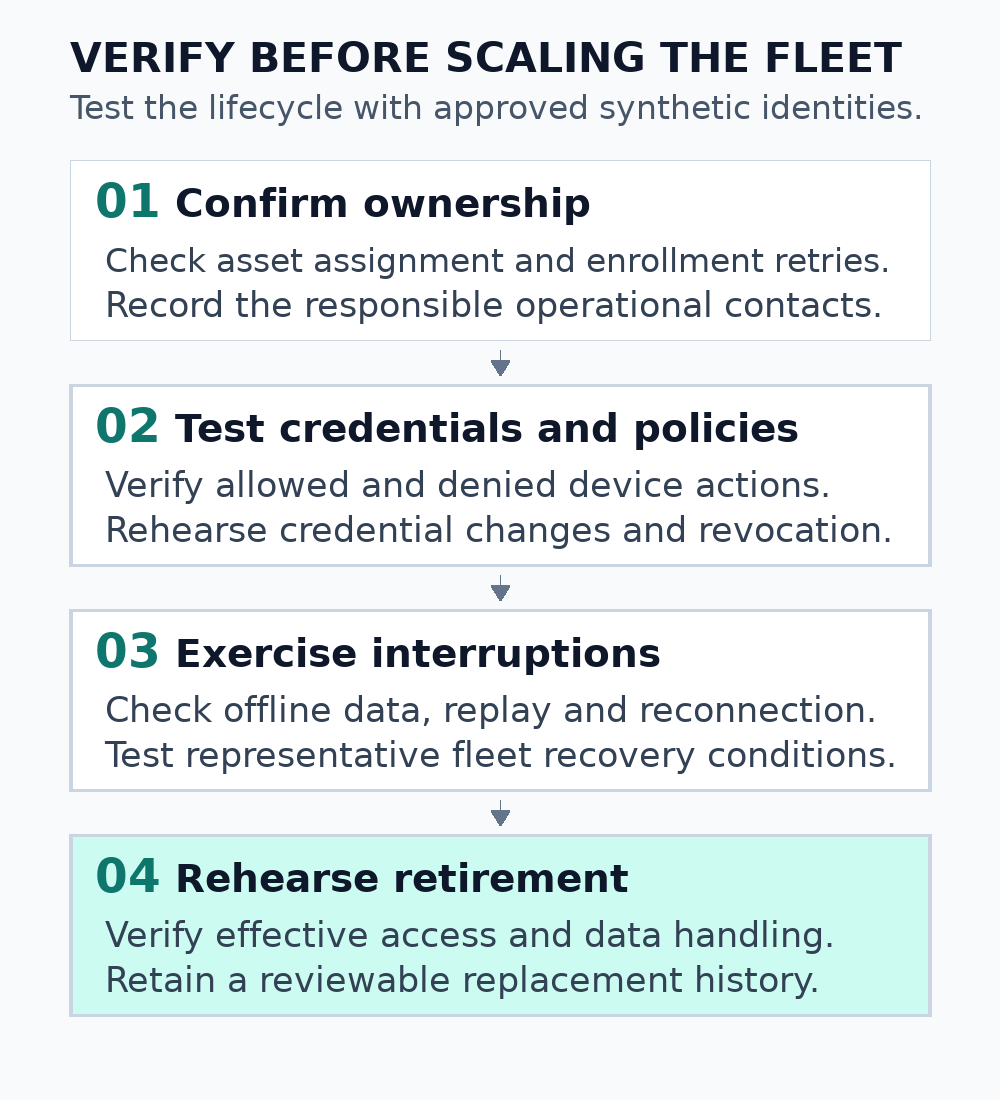
Figure 2. Verify the complete lifecycle, including failures that occur away from the installation site.
Define a practical pilot before scaling the fleet
Select a representative set of device models and operating conditions for the pilot. Include an interrupted enrollment, a prolonged offline period, a credential change, an unexpected restart and a retirement exercise. Use approved test identities and environments. Keep any physical testing within the equipment owner’s documented operating and safety procedures.
Make the pilot’s exit criteria explicit. Useful evidence includes correct asset assignment, constrained access, observable data delivery, recovery from the planned interruptions and a completed retirement record. Keep unresolved limitations visible to the people deciding whether the deployment is ready to expand.
Discuss connected-device security with Informatix Systems
A useful starting brief identifies the devices, business purpose, connectivity model, platform, identity approach and support arrangements. Include the expected fleet size and non-sensitive examples of the operational concern. This helps define an appropriate architecture, integration or security-review scope without exchanging production credentials.
Explore Telecom & IoT security services, or discuss secure IoT onboarding and lifecycle requirements.