
 Solutions
 Cyber Security
 Cloud Security
 DevSecOps Automation
 Cyber Threat Intelligence
 AI & MLOps Integration
 Security Operations
 Incident Response & Forensics
 Services
 Cloud Architecture & Migration
 Zero Trust & IAM Solutions
 SOC-as-a-Service
 Threat Detection & Response
 DevOps Infrastructure Design
 Penetration Testing & Red Teaming
 AI-Driven Security Analytics
 Industries
 FinTech Cybersecurity
 Healthcare Cybersecurity
 E-Commerce Security
 Government & Defense Security
 Telecom & IoT Security
 Managed Security Services
 24×7 Managed SOC
 Managed SIEM & SOAR
 Endpoint Detection & Response
 Vulnerability Management
 Cloud & App Security Monitoring
 Compliance Management
 AI Security Lab
 AI-Driven Threat Defense
 Neural SOC Platform
 Predictive Attack Modeling
 Security Data Lake
 Research & AI Lab
 Threat Intelligence Reports
 AI Security Models
 Machine Learning for Cyber Defense
 Open-Source Tools
 Publications & Whitepapers
 AI Innovation Center
 AI Research & Development
 Generative Security Models
 Autonomous Threat Simulation
 LLM Security Framework
 Future Technology Roadmaps
 Global Threat Observatory
 Global Cyber Threat Map
 Real-Time Attack Feed
 Regional Threat Reports
 Zero-Day Tracker & Alerts
 AI Risk Index Dashboard
 Resources
 Technical Insights & Advisory
 Case Studies & Solution Workshops
 Security Guides & Readiness Resources
 Technical Workshops & Team Enablement
 Knowledge Base & Operational Documentation
Mobile App Release Readiness: APIs, Permissions, Offline Data and Recovery
A mobile release can pass store review and still interrupt a customer’s work. The installed app depends on APIs, authentication, local data, device permissions and network conditions that a short happy-path test may miss. A release-readiness review brings those dependencies into one plan, with clear checks for deployment, monitoring and recovery.
AI-assisted technical guide · Updated 12 November 2026
This guide is for business owners and application teams preparing an Android or iOS update. Its examples are illustrative and do not describe a client deployment.
Define the business journeys that must keep working
Start with the activities that justify the app: signing in, finding a record, submitting an order, capturing a service visit or receiving an important update. Document the expected result and the systems involved in each journey. A screen loading successfully is not the same as the requested business action completing correctly.
Choose representative test accounts and synthetic records. Include a new user, an existing user upgrading from a supported version and a user with limited permissions. If the product has separate organizations or customer accounts, verify the correct scope after sign-in and account switching. Record who owns approval for each business journey.
Test the upgrade path as deliberately as a clean installation. Existing devices can contain older database structures, cached configuration, queued changes and authentication state. Define the versions from which upgrades are supported and what happens when a user skips several releases. Retain representative devices or repeatable fixtures for these states.
Build an app-to-service compatibility map
List the API versions, identity provider, file service, notification provider and other dependencies used by the release. Identify backend changes that must happen first and those that must remain compatible with older installed clients. Customers do not all update at the same moment, so the service may need to support more than one app version during the transition.
Review changes to field meaning, required values and response formats. An additional response field may be harmless to one client but break another client with strict parsing. A renamed status can affect offline reconciliation or workflow decisions even when the HTTP request succeeds. Verify the contract using supported old and new clients rather than assuming every change is additive.
Keep a release manifest containing the app build, backend build, configuration version and enabled feature set. Tie observations to these identifiers when investigating failures. If a feature can be controlled remotely, confirm that its disabled behavior is useful and that the client handles an unavailable or stale configuration response.
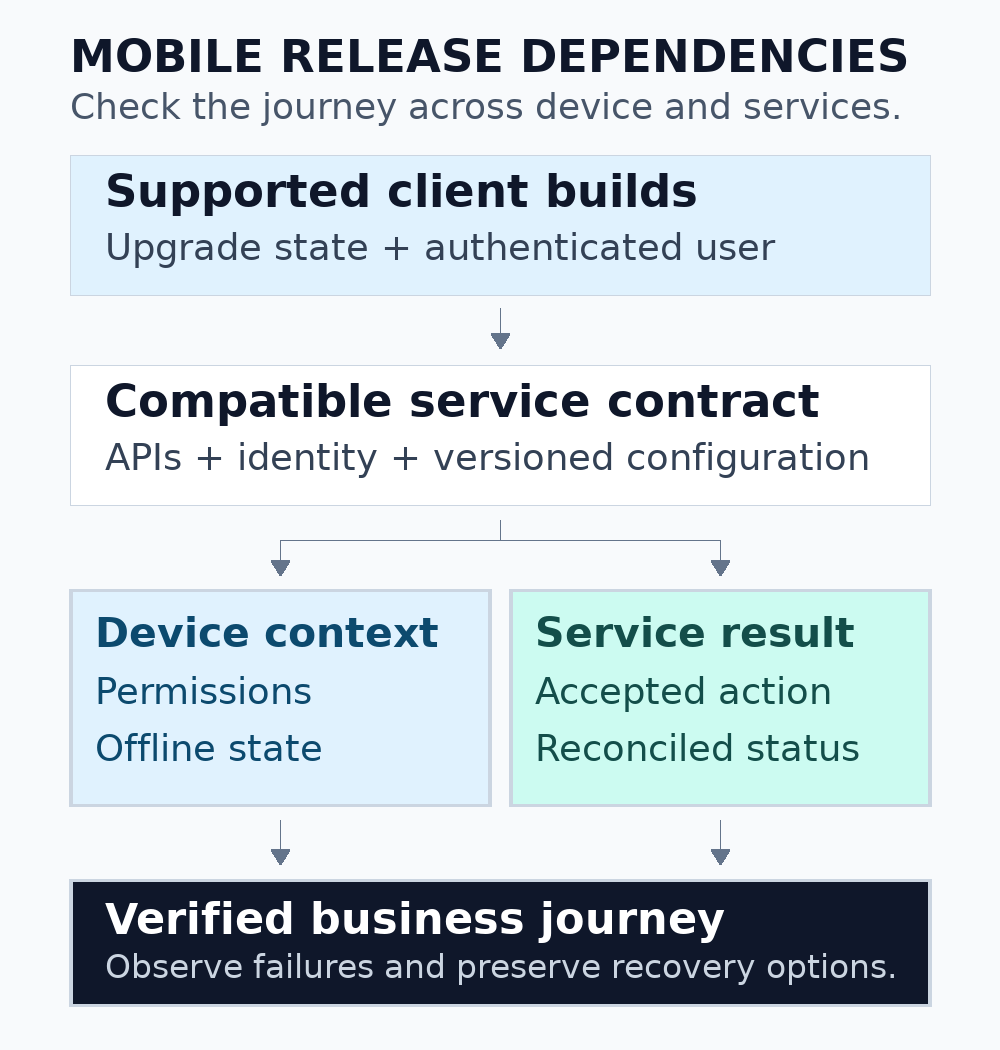
Figure 1. Review the complete journey, including the installed client, service contract and device state.
Review permissions at the moment they are needed
For every requested device capability, identify the business feature that needs it and the behavior when access is unavailable. Avoid treating permission approval as a prerequisite for unrelated features. A service app may still let a technician read assigned work when camera access is denied, even if photographic evidence must wait.
Android’s permission guidance recommends asking in context and handling denial or revocation gracefully. Test the actual behavior on the supported platform versions, including a user returning from system settings after changing access. Review the Android runtime permission workflow for the APIs used by the app.
Include explanatory text in the release review. The explanation should describe what the feature needs rather than promise that the platform will always grant access. Check localization, focus order and screen-reader labels in permission-related flows. Avoid a repeating prompt loop that prevents the user from understanding or changing the decision.
Test interrupted work and offline synchronization
Decide which actions are supported without a connection and how the interface communicates pending work. Distinguish a local save from a server-accepted submission. If users can queue changes, show whether a record is pending, synchronized or requires attention. Confirm that this status survives an app restart where the design requires it.
Android’s offline-first architecture guidance discusses a data layer that can provide useful behavior when the network is unavailable. Use that as an architecture reference, then define synchronization rules for the actual business operation. The correct conflict resolution for a draft note may differ from the rule for stock movement or a booking. See Android’s offline-first guide.
Use a concrete interruption scenario. A field worker submits a visit report, loses connectivity before receiving the response and retries after reconnecting. Verify whether the server accepted the first attempt and whether the second creates a duplicate. Define an appropriate operation identifier and reconciliation process in the application design; do not rely on the user remembering what happened.
Also test signing out, changing accounts and revoking access while changes are queued. Decide whether queued data is retained, isolated, discarded or requires a controlled recovery action. A queue belonging to one organization must not silently synchronize under another organization’s session. Review the confidentiality of local records and diagnostic exports.
Separate rollout controls from recovery controls
Write down what each recovery mechanism actually changes. Pausing distribution limits further exposure; it does not necessarily replace software already installed on a device. A backend rollback may be unsuitable after an irreversible data change. A new app build needs its own preparation and distribution path. These mechanisms should complement one another.
| Control | Useful purpose | Limit to plan around |
|---|---|---|
| Pause an app rollout | Reduce the number of additional users receiving the affected version | Already-installed clients may continue running that version |
| Disable a feature remotely | Contain a separable feature while retaining core functionality | The client must support the control and its unavailable-state behavior |
| Restore a compatible backend | Recover from a service-side regression | Client expectations and data changes must remain compatible |
| Publish a corrected app | Deliver a client-side fix | Preparation, review, distribution and user adoption take time |
Google Play documents that a halted staged rollout stops additional users receiving that staged version, while users who already received it remain on it. It also distinguishes staged updates from first-time publication. Check the current Google Play staged rollout guidance when preparing the release plan.
Apple provides phased release controls for version updates. Treat the store-specific settings as one part of the operational plan, with an owner who can monitor and act during release. Check the current App Store Connect phased-release documentation instead of assuming both stores behave identically.
Choose a device matrix that reflects the audience
Use actual support information and product requirements to choose the device matrix. Include the operating-system versions, screen sizes, storage constraints and network conditions that matter to the intended users. A test on one recent development phone cannot establish the behavior of a field workforce using older devices with limited free space.
Exercise the app after a cold start, an upgrade, a process interruption and a return from the background. Include an expired session and a server response that arrives after the user leaves the screen. Verify that the app does not report completion for an action that remains unresolved, and that a repeated tap does not create an unintended second operation.
Check text scaling, screen-reader navigation and the visibility of error messages in the critical journeys. Keep those checks in the release record with the supported device and platform scope. This turns accessibility and device coverage into repeatable acceptance work rather than assumptions attached to the final build.
Define useful release signals and stop conditions
Monitor technical health and business outcomes separately. Crashes, startup failures and API errors can reveal technical regressions. Failed submissions, stalled synchronization or unusual abandonment can reveal a workflow problem without a crash. Segment observations by app version, platform and the relevant device or account characteristics.
Set an observation period and an owner for each release stage. Define what would justify pausing, investigating or expanding distribution. Use a baseline suitable for the app’s traffic and risk; avoid borrowing a universal threshold without understanding the normal variation. Ensure the team can distinguish a lack of telemetry from a healthy release.
Prepare a small diagnostic record that support can collect without passwords, authentication tokens or complete customer datasets. Include the app version, approximate failure time, affected journey and an appropriate correlation identifier. Make sure the backend can connect that identifier to the relevant request or job without giving support unnecessary access.
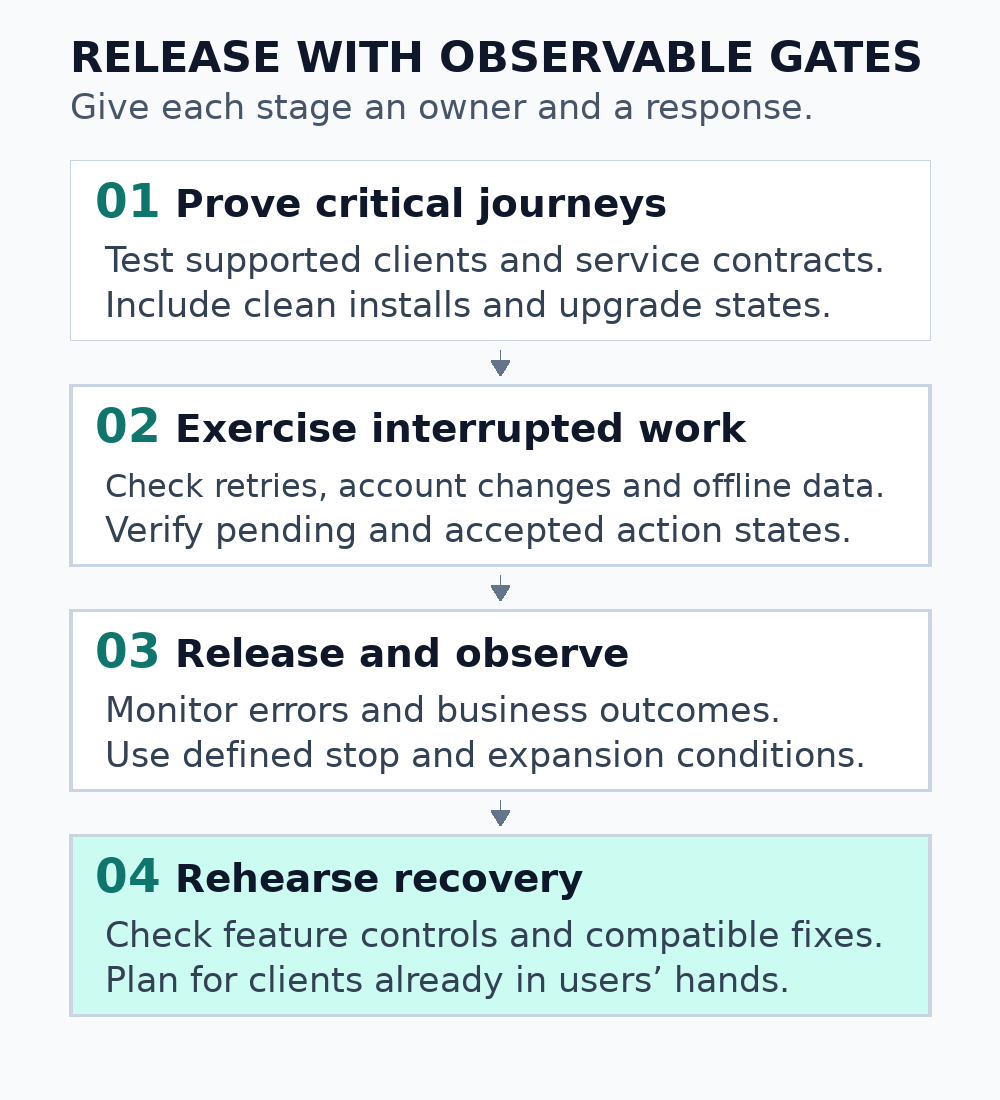
Figure 2. Give each release stage an owner, observable outcomes and a practical response to failure.
Run a recovery rehearsal before the release window
Walk through a plausible failure with the people who would handle it. Identify who can pause distribution, change an approved feature control, deploy a compatible service fix and communicate with affected customers. Verify access in advance; an untested administrator invitation is not a dependable release control.
Rehearse the data consequences as well as the deployment commands. If a client wrote a new local format or a backend migration changed record meaning, determine what earlier software can safely read. Some situations require forward recovery with a corrected build rather than a simple rollback. Record the decision and the conditions under which it applies.
Conclude with a release record containing the tested versions, unresolved limitations, approvals, monitoring links and recovery owners. After rollout, confirm that the intended build reached users and that the critical journeys remain healthy. Feed the observed issues back into the next upgrade and interruption test set.
Plan the next mobile release with Informatix Systems
A useful project brief identifies the app, supported devices, backend dependencies, important workflows and the problem the next release should solve. Include current release practices and non-sensitive examples of recurring failures. This helps define whether the work is a focused compatibility review, a release-readiness assessment or a broader engineering engagement.
Explore mobile application services, or discuss a mobile release-readiness review. Agree on the scope, testing access and deliverables before work starts.