
 Solutions
 Cyber Security
 Cloud Security
 DevSecOps Automation
 Cyber Threat Intelligence
 AI & MLOps Integration
 Security Operations
 Incident Response & Forensics
 Services
 Cloud Architecture & Migration
 Zero Trust & IAM Solutions
 SOC-as-a-Service
 Threat Detection & Response
 DevOps Infrastructure Design
 Penetration Testing & Red Teaming
 AI-Driven Security Analytics
 Industries
 FinTech Cybersecurity
 Healthcare Cybersecurity
 E-Commerce Security
 Government & Defense Security
 Telecom & IoT Security
 Managed Security Services
 24×7 Managed SOC
 Managed SIEM & SOAR
 Endpoint Detection & Response
 Vulnerability Management
 Cloud & App Security Monitoring
 Compliance Management
 AI Security Lab
 AI-Driven Threat Defense
 Neural SOC Platform
 Predictive Attack Modeling
 Security Data Lake
 Research & AI Lab
 Threat Intelligence Reports
 AI Security Models
 Machine Learning for Cyber Defense
 Open-Source Tools
 Publications & Whitepapers
 AI Innovation Center
 AI Research & Development
 Generative Security Models
 Autonomous Threat Simulation
 LLM Security Framework
 Future Technology Roadmaps
 Global Threat Observatory
 Global Cyber Threat Map
 Real-Time Attack Feed
 Regional Threat Reports
 Zero-Day Tracker & Alerts
 AI Risk Index Dashboard
 Resources
 Technical Insights & Advisory
 Case Studies & Solution Workshops
 Security Guides & Readiness Resources
 Technical Workshops & Team Enablement
 Knowledge Base & Operational Documentation
ERP, CRM and POS Data Migration: Reconciliation, Cutover and Recovery
An ERP, CRM or POS migration is successful when people can complete the required business processes with trustworthy data in the new system. A completed import job is useful evidence, but it does not prove that customer relationships, stock records, open documents and integrations all behave correctly. A reconciliation and cutover plan makes those expectations testable.
AI-assisted technical guide · Updated 12 November 2026
This guide is for business-system owners and technical teams preparing a migration. The examples are illustrative. Business owners should approve definitions and acceptance criteria for their own records and processes.
Define the operating scope before extracting records
List the business processes that must work on the first operating day: finding a customer, creating an order, receiving stock, recording a payment or producing an operational report. Identify the source and destination systems for each process and the person who can approve its behavior. Separate launch-critical functions from changes that can follow later.
Choose what history will move and what will remain accessible in an archive. A new platform may need open transactions, current master data and selected historical context rather than every legacy field. Document the retention and access requirements with the appropriate business owners. Ensure that an archived record can still be found by the people who need it.
Distinguish configuration, reference data, master records and business documents. A document can depend on a customer, a product, a unit of measure and other reference values. Plan the import order around these relationships. Include company, branch, warehouse and currency scope where those distinctions affect the destination’s interpretation.
Create a mapping contract with explicit exceptions
For each migrated entity, record the source field, destination field, transformation rule, required status and validation owner. Include identifiers, allowed values, date interpretation, units and default behavior. A blank value, a zero and an unknown value may mean different things; do not let an import tool silently decide which meaning is intended.
Keep an identifier crosswalk when the destination assigns different keys. This supports relationship validation, integration updates and investigation of individual records. If several source records are merged, preserve the approved merge decision and the mapping to the destination. Define how the team will handle duplicates before the final migration window.
Maintain an exception register for records that cannot be transformed automatically. Give each exception an owner, proposed treatment and acceptance decision. Some records can be corrected in the source, others need a documented mapping rule, and some may be excluded with approval. A rejected record should not disappear from the migration record merely because the next batch succeeded.
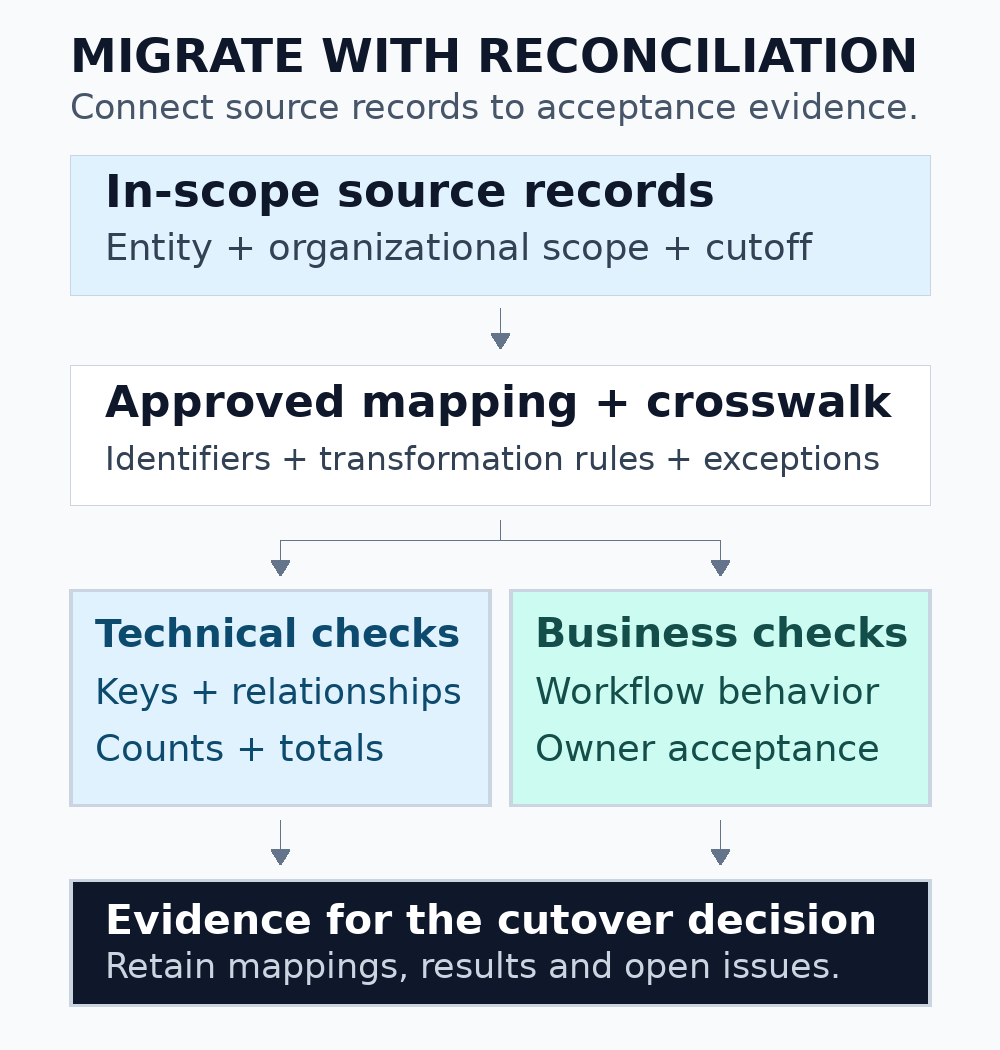
Figure 1. Keep the mapping, import result and reconciliation evidence connected for every in-scope entity.
Use supported import mechanisms and retain execution evidence
Prefer the destination platform’s supported migration or integration mechanism where it meets the requirement. Direct table writes can bypass application behavior that creates related records or enforces business rules. If a supported mechanism is unsuitable, establish the alternative with the platform owner and test its consequences explicitly rather than treating database access as sufficient authorization.
For example, Microsoft describes Dynamics 365 finance and operations data management through entities, projects, jobs, packages and execution history. These concepts separate business data from raw table structure and provide an import context to investigate. The exact facilities depend on the product and release. See Microsoft’s data management overview.
Retain the approved input package, mapping version, job identifier, timestamps, accepted and rejected counts, and the execution result. Record whether a rerun inserts, updates or replaces records for the entity involved. Test retry behavior with a small fixture before repeating a failed production import. A retry that is safe for one entity may duplicate another type of document.
Reconcile at several levels
Use a layered comparison. Row counts can identify missing batches, but equal counts can conceal a missing record and an unintended duplicate. Key comparisons can identify those cases, while relationship checks show whether imported documents point to the correct master records. Business-process tests establish whether the destination can use the resulting data as intended.
| Check | Useful evidence | What it does not establish alone |
|---|---|---|
| Counts by entity and scope | Expected batches, branches and record groups arrived | The correct individual records arrived without substitution |
| Identifier reconciliation | Source records map to the intended destination records | Every field and relationship is correct |
| Relationship validation | Documents reference the intended customer, product or location | The business workflow completes correctly |
| Approved aggregate comparisons | Defined quantities and totals reconcile for the same cohort | Individual records cannot contain offsetting errors |
| Business-process acceptance | Representative end-to-end tasks work with migrated data | Every untested record or unusual scenario is correct |
Align the comparison period, organizational scope and data-as-of cutoff. A source export created before a late adjustment can differ from a destination checked after the adjustment was replayed. State how corrections and late records enter the reconciliation. Keep original observations so the team can explain a change rather than only presenting the latest matching total.
Define acceptance thresholds with the owners of the affected process. Some identifiers may require an exact match, while other derived values may have a documented transformation or rounding rule. Record the reason for any permitted difference. Technical staff should not invent a tolerance simply to make a reconciliation report pass.
Investigate mapping errors with a small worked example
Consider a source customer code stored as the text “00127.” A transformation that treats the code as a number can produce “127.” Whether those values identify the same business record is a mapping decision, not a formatting preference. Verify the intended rule before importing records or joining them to transactions.
Build a small fixture containing leading zeros, empty values, non-ASCII names, unusually long descriptions and records with several related documents. Check what the export, transformation and import preserve at each stage. Add a record that should be rejected and confirm that it appears in the exception report with a useful reason.
Use this fixture when changing a mapping rule or import configuration. It provides a quick way to detect a regression before repeating a large migration rehearsal. For a broader method of tracing inconsistent values and counts, see the data quality assessment guide.
Test the real operating workflow
Use representative synthetic scenarios that combine migrated data with new activity. For example, locate a migrated customer, create a new order, process its approved workflow and inspect the resulting operational status. For inventory, check the relevant location and unit rules. For customer-service work, verify that a person can find the necessary history without excessive access.
Test integrations in both directions. A web store, payment service, warehouse tool or reporting pipeline may continue sending legacy identifiers or assume an older status vocabulary. Verify the identifier crosswalk and error handling at each boundary. Confirm that a temporary migration interface cannot accidentally continue processing after normal integration resumes.
Use the destination’s intended security roles during acceptance. A successful test with an administrator can conceal missing permissions for ordinary staff. Microsoft’s guidance on data entities discusses security privileges for data management and integration scenarios. Review the relevant entity security documentation for a Dynamics-based implementation.
Rehearse the final cutover with representative conditions
Run a timed rehearsal using a representative dataset, import sequence and validation process. Measure extraction, transfer, transformation, import, exception handling and business checks separately. Include the time needed for people to review results and make a decision. A fast import does not guarantee that the whole cutover fits the operating window.
Document the final-change capture method. Depending on the systems, this may involve an agreed pause in writes, an incremental transfer or another supported mechanism. Identify every channel that can create records during the transition, including scheduled jobs, integrations and offline POS devices. Explain how each channel is paused, drained or reconciled.
Microsoft’s migration optimization guidance recommends representative testing and cautions against extrapolating results from an unsuitable environment. Use the platform’s current documentation to plan performance work, then verify the result in an environment that reflects the actual cutover. See Dynamics data migration optimization guidance.
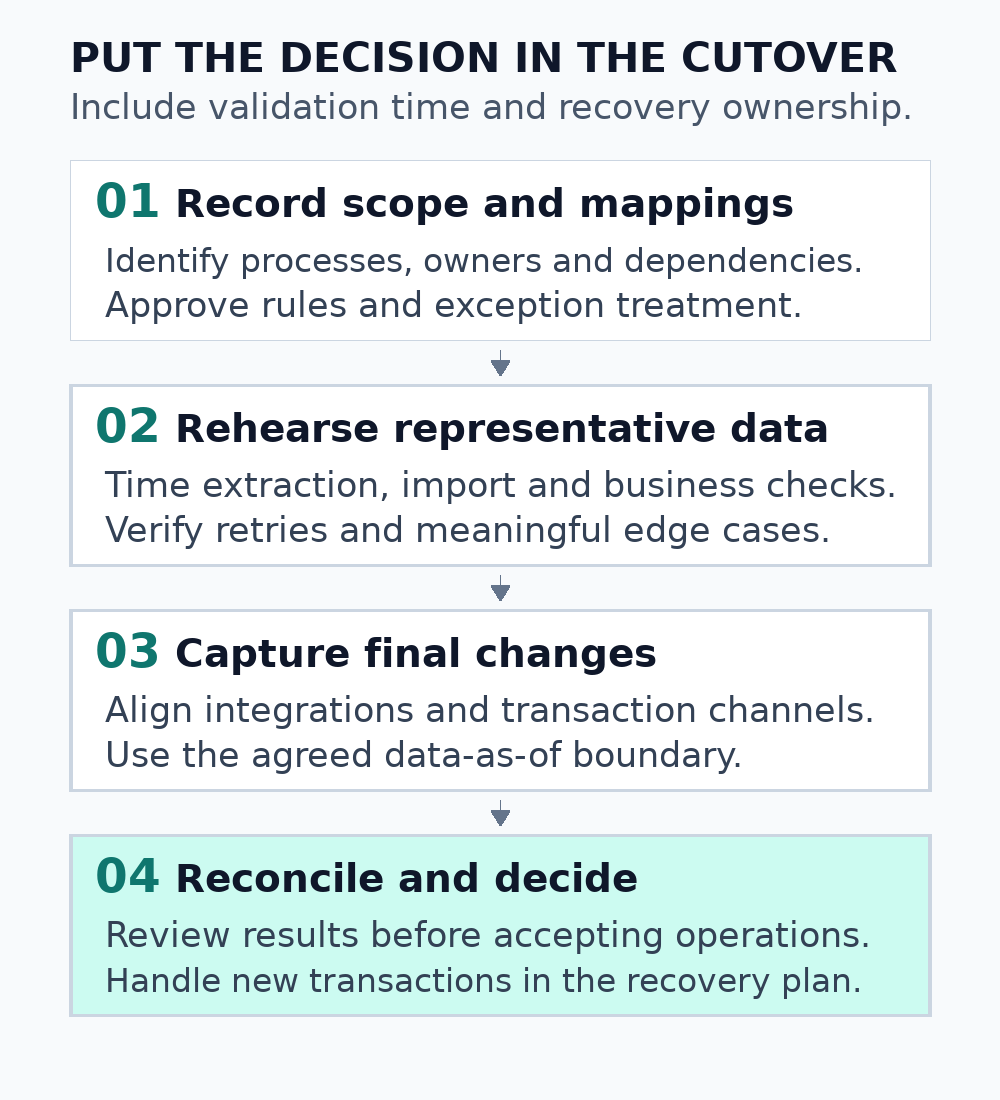
Figure 2. Put validation and the business decision inside the cutover window, with a clear owner for recovery.
Plan recovery around new transactions
A recovery plan needs more than a copy of the old database. Determine the point at which users or integrations can create new transactions in the destination. If the business returns to the source after that point, decide how those new records will be reconciled. Prevent two systems from independently accepting the same business event without an agreed resolution process.
Define decision times, owners and evidence for continuing, pausing or recovering. Identify which actions are reversible and which require forward repair. Rehearse access to the backup and verify that the intended recovery procedure works in the chosen environment. Keep the recovery material restricted to the people who need it.
During the first operating period, monitor exception queues, integration failures, reconciliation differences and support requests. Schedule a business-owner review of unresolved items. Retire temporary access and migration interfaces when their purpose ends, and preserve the mapping and evidence needed for subsequent investigation or maintenance.
Scope a migration review with Informatix Systems
A practical starting brief names the source and destination platforms, in-scope processes, data volume, integrations and operating constraints. Include the current mapping and a non-sensitive example of a reconciliation problem where available. This supports a defined assessment or implementation scope with owners and acceptance criteria.
Explore ERP consultancy and software integration services, or discuss an ERP, CRM or POS migration.